

Call us 24/7+86 18150137010
Welcome to Industrial Control Trading Co., Ltd. Email: itadcs@163.com Whatsapp:+86-17750137010
Call us 24/7+86 18150137010

Panel 800 Version 6- Panel Builder Version 6.0-1 ABB

The Panel Builder software is used to configure operator panels PP871, PP874,

PP877, PP882 and PP885 from ABB.

Panel Builder contains all basic functions needed in an application. The functions

are tested and developed with customer needs and preferences in focus.

Pre-defined objects in Panel Builder can be used to create complete process images,

providing an overview of a complex application. You can customize the pre-defined

objects or create objects of your own.

Communication drivers for a large number of controllers and automation equipment

are available.

The help file assumes that the most recent versions of the system program (image)

and Panel Builder are used
The Panel Builder software is supplied on a DVD.  Double click on the file setup.exe

found on the DVD, and follow the instructions to install Panel Builder.

The installation creates an icon for Panel Builder in the group named Panel Builder.

Click on Start/All Programs/Panel Builder 800 Version 6/Panel Builder 800

Version 6 to start Panel Builder.

The top folder for a specific application designed with Panel Builder is referred

to as the project folder.

During runtime, project database files can be updated, for example with new recipes.

This means that to completely reproduce a project that has been in operation, it may

be necessary to combine source files with files retrieved from the operator panel.

File Structure

Aproject contains a set of files related to the functional and graphical design and

asetoffiles related to the runtime operation of the project, where the latter is

compiled from the design files.

Project Folder

When a new project is created, a folder with the project name is created as the

top-level container, the Project folder.  The files that define the functional and

graphical design reside in the top level of the project folder.  Other folders are created

as a result of validation and build

Symbols

Pictures that are used in projects are converted to .png files when the project is

validated.

Pictures are resized to the largest static usage in any of the project screens, in order to

save memory space in the panel. If a picture is enlarged in runtime using dynamics,

the enlarged picture will have a lower effective resolution.

Project pictures are stored in the Symbols folder as a compressed folder named

Symbols.zip.

Temp

The Temp folder contains intermediate build files from project compilation.

The Temp folder also includes the Output folder. The Output folder contains all

iles needed to run the project in the target. These files are copied to an operator

panel when the Transfer command is used. For a PC, the Transfer to folder

command is used to copy the necessary files to a USB stick to the runtime PC via

anetworkconnection.

Moving Design Files

To move theprojectfiles needed for the design:

Create a new folder for the project design files.

Copy all single files (files not included in any folders) as well as all folders,

except the Temp folder, in the project folder.

Paste the files in the new folder.

Moving Application Project

The runtime project can be downloaded to the operator panel using the transfer or

export commands, but can also be moved manually:

Create the new folder for the project files.

Copy the Output folder.

Paste it in the new folder

Database

The database used for Panel Builder projects is of SQL Server Compact Edition type.

The contents of the database can be managed with third-party database management

tools. Panel Builder includes a database viewer object that can be used to display

database contents in runtime.

The database is initially transferred to the operator panel using the transfer command.

The database will only be updated if there are changes made in the project that

affects the database contents, for example:

• Changed or added recipes

• Changed or added data loggers

mhandling

• Changed or added trend viewers

Acopy of the database can be made with the Upload Database command. Some of

the databases can be exported individually in csv, comma separated values, format

using the Database Export action. If possible, it is recommended to use the database

export action rather than the backup database a
ABB Panel 800 Version 6- PP885

AllPanel800Version6aredevelopedtosatisfythedemandsofhuman-machine

communication.  Built-in functions such as displaying and controlling text, dynamic

indication, time channels, alarm and recipe handling are included.

The Panel 800 Version 6 works primarily in an object-oriented way, making it easy

to understand and use.  Configuration is carried out on a PC using the Panel Builder

configuration tool.  The project can then be transferred and stored in the operator

panel itself.

Theoperator panel is designed for stationary installation on a planar surface,

where the following conditions are fulfilled:––––

no high explosive risks

no strong magnetic fields

no direct sunlight

no large, sudden temperature changes

• Installthe operator panel according to the accompanying installation instructions.

• Ground the operator panel according to the accompanying installation

instructions.

• Onlyqualified personnel may install the operator panel.

• Separate the high voltage, signal and supply cables.

• Makesure that the voltage and polarity of the power source is correct before

connecting the operator panel to the power outlet.

• Peri

pheral equipment must be appropriate for the application and location.

• InaZone2environment, this equipment shall be installed in an enclosure that

provides a degree of protection not less than IP 54 or greater than IP 65 in

accordance with IEC/EN 600079-0.   The IP rating of the equipment is limited to

the IP rating of the enclosure it is to be installed into.

• InaZone 22 environment, this equipment shall be installed in an enclosure

that provides a degree of protection not less than IP 64 or greater than IP 65 in

accordance with IEC/EN 600079-0.   The IP rating of the equipment is limited to

the IP rating of the enclosure it is to be installed into.

During Use

• Keepthe operator panel clean.

• Emergency stop and other safety functions may not be controlled from the

operator panel.

• Donotuseexcessive force or sharp objects when operating the touch screen.

Service and Maintenance

• Onlyq

ual

ified personnel should carry out repairs.

• Theagreed warranty applies.

• Before carrying out any cleaning or maintenance operations, disconnect the

equipment from the electrical supply.

• Clean the display and surrounding front cover with a soft cloth and mild

detergent.

• Replacing the battery incorrectly may result in explosion.  Only use batteries

recommended by the supplier.  During the warranty period, the battery needs to

be replaced by an authorized ABB service center.

Dismantling and Scrapping

• Theoperator panel or parts thereof shall be recycled according to local

regulations.

• Thefollowing components contain substances that might be hazardous to health

and the environment: lithium battery, electrolytic capacitor and display.

Appearance of Air in Touch Screen

The layer structure of the touch screen contains air and in rare cases appearance of

bubbles can arise.  This is purely cosmetic and does not affect any functionality of the

operator panel.  The appearance can occur under certain environmental conditions

such as temperature, humidity, and atmospheric pressure.

ABB IndustrialIT Panel 800 – PP846 Version 5.1

The Panel 800 operator panel is developed to satisfy the demands of human

machine communication. Built-in functions such as displaying and controlling text,

dynamic indication, time channels, alarm and recipe handling are included.

The operator panel work, for the most part, in an object-oriented way, making it

easy to understand and use. The configuration operation of the panel is made in a

personal computer, using the configuration tool Panel Builder 800. The project is

then transferred and stored in the operator panel.

The operator panel can be connected to many types of automation equipment, such

as PLCs, servos or drives. In this manual the expression “the controller“ is used as a

general term for the connected equipment

Both the installer and the owner and/or operator of the operator panel must read and

understand this installation manual.

UL and cUL Installation

• This equipment is suitable for use in Class I, Division 2, Groups A, B, C and D

OR non-hazardous locations only. [Combinations of equipment in your system

are subject to investigation by the local Authority Having Jurisdiction at the

time of installation].

• Maximum ambient temperature 40 °C when mounted horizontal or 50 °C when

mounted vertical.

• WARNING – EXPLOSION HAZARD – Do not disconnect equipment unless

power has been removed or the area is known to be non-hazardous.

• For Canada also AVERTISSEMENT – RISQUE D’EXPLOSION – AVANT

DE DECONNECTER L’EQUIPEMENT, COUPER LE COURANT

OUS’ASSURER QUE L‘EMPLACEMENT EST DESIGNE NON

DANGEREUX.

PP846

ABB IndustrialIT Panel 800 – PP836 Version 5.1

The Panel 800 operator pane lis developed to satisfy the demands of human

machine communication.   Built-in functions such as displaying and controlling text,

dynamic indication, time channels, alarm and recipe handling are included.

The operator panel work, for the most part, in an object-oriented way, making it

easy to understand and use.   The configuration operation of the panel is made in a

personal computer, using the configuration tool Panel Builder 800.   The project is

then transferred and stored in the operator panel.

The operator panel can be connected to many types of automation equipment, such

as PLCs, servos or drives.   In this manual the expression “the controller“ is used as a

general term for the connected equipment.

The operator panel is designed for stationary installation on a plane surface,

where the following conditions are fulfilled:– no high explosive risks.  – no strong magnetic fields.  – no direct sunlight.  – no large, sudden temperature changes.

• Install the product according to the accompanying installation instructions.

• Ground the product according to the accompanying installation instructions.

• Only qualified personnel may install the operator panel.

• Separate the high voltage, signal and supply cables.

• Make sure that the voltage and polarity of the power source is correct before

connecting the product to the power outlet.

• Peripheral equipment must be appropriate for the application and location.

During Use

• Keep the operator panel clean.

• Emergency stop and other safety functions may not be controlled from the

operator panel.

• Do not use too much force or sharp objects when touching the keys, display

etc.

Service and Maintenance

• Only qualified personnel should carry out repairs.

• The agreed warranty applies.

• Before carrying out any cleaning or maintenance operations, disconnect the

equipment from the electrical supply.

• Clean the display and surrounding front cover with a soft cloth and mild

detergent.

• Replacing the battery incorrectly may result in explosion.  Only use batteries

recommended by the supplier.

Dismantling and Scrapping

• The operator panel or parts thereof shall be recycled according to local

regulations.

• The following components contain substances that might be hazardous to

health and the environment: lithium battery, electrolytic capacitor and display.

ABB Control Panels CP405 Control Panels CP408

Introduction The operational guidelines described below is information which relates to the device, place of employ ment, transportation, storage, assembly, use and maintenance. The Control Panels have been designed for installation and use in an industrial environment in compli ance with the 2004/108/EC EMC Directive. The products have been designed in compliance with: EN 61000-6-4   EN 61000-6-2   EN 55022 Class A EN 61000-4-2 EN 61000-4-3 EN 61000-4-4 EN 61000-4-5 EN 61000-4-6 EN 61000-4-8

CP405 CP408

The installation of these devices into the residential, commercial and light-industrial environments is al lowed only in the case that special measures are taken in order to get conformity to EN 61000-6-3. The products are in compliance with the Restrictions on Certain Hazardous Substances (RoHS) Directive 2011/65/EC. In compliance with the above regulations the products are CE marked. This Operating Instruction describes the main features of the CP405 and CP408 Control Panels.

The Op erating Instructions refer to the following models: Product Overview The Control Panels combine state-of-the-art features and top performance with an outstanding design. They are the ideal choice for all demanding HMI applications including discrete automation and most in dustrial applications. These Control Panels have been designed to run the CP400PB Panel Builder 400 software. CP400PB Panel Builder 400 Runtime included. Full object dynamics: Control visibility and transparency, move and resize any object on screen. Change properties of basic and complex objects.

Multilanguage applications. Easily create and manage your applications in multiple languages to meet global requirements. Far East languages are supported. Data display in numerical, text, bar graph, analog gauges and graphic image formats. Rich set of state-of-the-art HMI features: Data acquisition, alarm handling, scheduler, recipes, users and passwords. Includes support for a set of communication drivers e.g. AC500/AC500eCo and Motion drives. Offline and online simulation with CP400PB Panel Builder 400. Powerful scripting language for automating HMI applications. Script debugging improves efficiency in application development.

ABB PowerUP for medium voltage drives

PowerUP for medium voltage drives

Maximizing throughput, productivity and availability

Would you like to increase

the productivity of your drive

system?  Are you interested in better

management of the transient

behavior during load variations?

ABB’s PowerUP service helps

you to achieve a higher system

output power with minimal

system changes

ABB’s PowerUP service offers owners of ACS1000.

ACS5000. ACS6000 and MEGADRIVE-LCI medium

voltage drives a cost-efficient way to boost

productivity, improve availability and increase

overall system efficiency and reliability.

Output power can be boosted by up to 25 percent,

depending on your system’s set-up, while also

making the installation resilient to transient

conditions, thereby avoiding unplanned

shutdowns.

Using ABB’s engineering experts to support you

through the PowerUP journey means that the

correct system modifications are identified and

implemented quickly, ensuring your process is

up and running rapidly.

Moreover, ABB provides any required consultation

or data that may be needed to re-certify equipment

beyond the electric drive, for example, motor.

Advant® Master S100 I/O system ABB

ABB Advant® Master S100 I/O system

The S100 I/O process interface modules for Advant Controller 400 series process controllers come with connection units, simplifying cable termination and keeping noise and destructive spikes away from the central electronics

S100 I/O is the central process interface for Advant

Controller 400 series process controllers. Thanks to

built-in cablemarshalling facilities and parallel

communication with the host controller, it is the

right choice for centralized I/O systems and

high-speed applications.

The range of process I/O modules is complete,

consisting of general purpose digital and analog

inputs and outputs and special interfaces for special

tasks. These specials include pulse counting,

frequency measuring, positioning, motor speed

control and communication with other controllers.

All I/O modules provide simple interfacing, accurate –

yet fast – control, and easy integration of individual

loops into a comprehensive plant-wide control

and supervision system.

The interface modules connect to the process

through screw terminals on connection units

normally installed inside, at the back of the cabinet.

This solution keeps noise and destructive voltage

spikes away from the central electronics and

provides a neat and tidy process interface that is

easy to maintain.

Prefabricated cables interconnect modules with

connection units. The cables come in different

lengths, permitting termination and marshalling

in controller cabinets, in adjacent cabinets, or in

cabinets a greater distance away.

There are connection units that support signal

oriented or device-oriented field wiring. The former

means that field wires with the same electrical

characteristics (e.g. all 24 V d.c. inputs) are grouped

and terminated together, the latter that field wires

to/from the same field devices are grouped and

terminated together. The combination means

maximum installation flexibility.

GE MiCOM P40U Connect MiCOM P40 IEDs to PCs with USB ports

GE MiCOM P40U Connect MiCOM P40 IEDs to PCs with USB ports

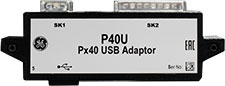
The P40U adaptor is the solution for users who want to communicate with GE Vernova MiCOM P40 IEDs via PCs that have USB communication ports.

The P40U Px40 USB Adaptor is used to connect local serial/parallel port relays to a laptop/PC, so that settings may be transferred to/from the relay and PC, allowing firmware updates and menu text editing. The P40U Adaptor fits any MiCOM P40 relays in GE Vernova’s installed base including Areva, GE VERNOVA and GE Vernova brands.

Using this adaptor is quick and easy. Simply install the S1 Agile version 1.4.2 or higher on your PC, plug in the adaptor and you are ready to communicate.

Features and Benefits

Designed for high speed transmissions for optimal performance

Special adaptor software not required – all is hosted natively within the S1 Agile toolsuite

Serial and parallel port connection in-one

Allows common interface cable to be used for the installed base with legacy ports and future MiCOM P40 with native USB

Specifications

RS-232C standard compliant

DB 9 male and DB25 male connectors

Powered by PC workstation USB Port

Hardware Requirements

Windows based PC with USB Port

USB-Serial Driver Operating Systems supported:

Windows 7 (32-bit & 64-bit)

Windows 8.1 (64-bit)

Windows 10 (32-bit/64-bit)

Supported Devices

P14x Feeder Management Relay

P145 High Impedance Busbar Relay

P24x Motor Management Relay

P34x Generator Management Relay

P44x & P44y Line Distance Relay

P54x Line Current Differential Relay

P54M Multi-ended Line Current Differential Relay

P547 Phase Comparison Relay

P64x Transformer Management Relay

P746 & P747 Centralized Bus Differential Relay

P740 Decentralized Bus Differential System Relay

P84x Feeder Management Relay

P847 Phaser Measurement Relay

ABB Advant Controller 31 Hardware 90 Series

1.3

General instructions for EMC-compatible installation

Systemdaten und Systemaufbau

Electric and electronical devices have to work correctly on site.  This is also valid when electro-magnetic influences affect

them in defined and/or expected strength.  The devices themselves must not emit electro-magnetic noises.

Advant Controller components are developed and constructed so that they have a very high noise immunity.  When the

wiring and earthing instructions under “System data and system configuration” in volume 2 are met, an error-free opera

tion is given.

However, there are applications where high electro-magnetic noises must be taken into due consideration already during

the planning phase: e.g. when frequency converters, compressors, small-power pumps (high inductance) or medium

voltage switchgear are mounted nearby.  An EMC-compatible earthing concept will also guarantee here an error-free

operation.

There are three important principles to be especially considered:

• Keep all connections as short as possible (in particular the earthing conductors)

• Use large conductor cross sections (in particular for the earthing conductors)

• Create good and large-sized contacts (in particular for the earthing conductors)- vibration-resistant connections- clean metallic contact areas (remove paint, clean surfaces)- solid plug and screw-type connections- earth cable shields with clips on a well grounded metallic surface,- do not use sheath wires- do not use toothed lock washers under screwed connection

1.4   Check list for project planning and installation

good contact

This chapter contains a list of reminders to check whether all of the important items have been taken into consideration

during planning and installation

1.4.2 Everything firmly attached

• AC31 module firmly plugged on the plug-in base (all screws fastened)

1.4.3 Everything correctly set

• Operating modes correctly set on the modules (e.g. DIL switch)

• Correct input/output terminals on the modules used (e.g. voltage inputs or outputs on the analog modules

• Adresses correctly set

1.4.4 Laying cables

• Power cables (230/400 V) laid out separately from the control cables (24 V, analog signals), whenever

possible with a distance of 20 cm or more

• Sufficient conductor cross sections

• Sufficient cable insulation / cable shielding

• Supply lines of the power supply connected to the central units with flanged couplers

(e.g. 07 KT 97 with 07 KP 90)-

The supply lines are first connected to the central unit (07 KT 97), and then looped

to the coupler (07 KP 90), see the descriptions of the coupler.

1.4.5 PE connection

• Infeed of earthing potential to the PE bar with large conductor cross section

• Connection of the PE bar to the mounting steel plate

• Connection of the switchgear cabinet components to each other

• Connection of movable switchgear components to PE (doors)

• PE Faston connection of central units and couplers (see module descriptions)

• CS31 bus shield to PE

• Connections between analog cable shields and PE

• Reference potentials of the output voltages of the power supply units are interconnected and grounded

1.4.6 CS31 System bus (see also volume 2. system data, system design)

• Bus line is looped through from module to module

• no spur lines

• Bus length (max.  500 m, measure cable length before installation, when necessary)

• Bus terminating resistors (see system data)

• Bus terminals (BUS1 to BUS1. BUS2 to BUS2)

ABB Advant Controller 31 Series 40 and 50

1.1 General information on the AC31 system

The AC31 system consists of the series 30. 40. 50. and 90. This operating manual describes

the series 40 and 50.

The AC31 brings accessibility to beginners and experienced automation users alike, for any

application with 14 to approximately 1000 inputs / outputs and more, using the same set of

basic components.

From a compact machine fitted with a few automated functions to large installations spread over

hundreds of meter, and even kilometers, the AC31 can fit your requirements.

It is therefore possible to realize distributed applications throughout a site, a workshop, or a

machine where each component (input / output units, basic unit) is close to the sensors /

actuators. The whole setup is connected by a single twisted pair over which all information from

the sensors is sent after processing by the basic unit to the actuators via the remote modules.

Additional central units configured as slave can also be connected to this CS31 system bus.

In case of the series 40 and 50 the following communication interfaces are available, to extend

the AC31’s possibilities and integration with the company’s other automation systems:

MODBUS, ASCII, ARCNET, RCOM, AF100. The developments in this field are continual.

Many users on all the continents have realized numerous applications such as:

Machine control:—-

Manufacturing of floor boards

Assembly of electrical contactors

Manufacturing of ceramic products

Metallic pipe welding, etc.

Controlling-commanding installations:-

Wharf cranes—

Water treatment

Ski lifts

Wind power machines, etc.

System management:—–

Climatic anagement

Building power management

Tunnel ventilation

Alarms in hospital environments

Greenhouse lighting / humidity, etc.

1.2 General set-up rules

An ABB AC31 system always includes at least one AC31 basic unit. There are three types of basic

units:- The 40 series basic unit, with a local interface for central inputs / outputs extensions- The 50 series basic unit, with a local interface for central inputs / outputs extensions

and a CS31 system bus interface for decentralized extensions- The 90 series basic unit, with a CS31 system bus interface for decentralized extensions

Each basic unit incorporates a specific number of digital inputs/outputs and in case of the series 90

occasionally analog inputs/outputs. It is possible, depending on the basic unit, to increase the

number of inputs / outputs, to add input / output extensions connected directly to the basic units or

remote input / output units via the CS31 twisted pair

1.2.1 Basic units with central extensions

With the 40 and 50 series, it is possible to increase the number of inputs / outputs of the basic

unit by adding up to 6 local extension units of either type, digital or analog (refer to figures 1a

and 1b)

1.2.2 Basic units with CS31 system bus

With the 50 and 90 series it is possible to increase the number of inputs / outputs of the basic

unit by adding remote units. The basic unit controlling the system is called the MASTER basic

unit. The maximum bus length is 500 m without an amplifier and 2000 m with 3 amplifiers

(1 NCB or NCBR unit enables bus amplification for 500 m)

A master basic unit can manage up to 31 connection points, such as:- Series 50 remote units with central extension possibilities: a maximum of 6 extension units

comprising of e. g. a maximum of 8 analog input channels and 8 analog output channels- Series 30 and 90 remote unit (without central extension possibilities) with analog or digital

inputs / outputs- An ABB NCSA-01 variable speed drive interface- A high-speed counter unit- 30. 50 and 90 series basic units as slave with their own user program- Or any other device which supports CS31 communication.

Comment:

A connection point fitted solely with digital channels occupies 1 connection point.

A connection point fitted with digital and analog channels occupies 2 connection points of the

available 31.

The maximum number of remote analog units depends on the MASTER basic unit:- 50 series:- a maximum of 31 remote analog input units

or- a maximum of 31 remote analog output units

or- a maximum of 15 central extensible remote units (ICMK 14 ..) with analog

input/output extensions + 1 remote analog input/output unit (15 x 2 + 1 = 31)- a mixed digital/analog configuration within the previous limits- 90 series:- a maximum of 12 remote analog input units

or- a maximum of 12 remote analog output units

or- a maximum of 12 central extensible remote units with analog extensions

Search for products

Back to Top
Product has been added to your cart
phone: +86 18150137010
to whats
+8618150137010
to whats
+8618150137010
email: industrialists.yan@gmail.com